


The CAPEX request approval workflow is now live.
After the successful launch of the Capex Governance Committee last year by Abi Babbage, a new process for capital expenditure (CAPEX) approvals has been developed, following collaboration with Toby Russell, Chief Digital, Development and Disruption Officer.
Effective immediately, all CAPEX project approvals will be performed via our workflows tool, removing the need for email chains. This will help ensure appropriate controls are embedded within the approval process of every capital project across the Colart Group!
If you need to submit a CAPEX request, then you do so in conjunction with your Finance Lead.
Instructions to access this workflow.
1. From the intranet home page, click on the bell, located on the far top right hand side.
This will take you to the Workflow homepage (note: you cannot go back to the intranet from the this page. You will need to open a new tab to access the intranet homepage again).

2. Then select >Finance>Capex>Submit Request as shown in the image below.
Each request submission should be managed by the finance lead for each business unit https://workflows.colart.com/finance/capex-approval-request/.

3. This will produce the CAPEX Approval Request page, as shown in the image below.
a. This workflow will be required in conjunction with the existing Capex Toolkit spreadsheet, which will need to be completed in the same way as before.
b. There are various mandatory fields that are required to be filled out/selected appropriately before you can submit each request, the details included in the workflow should match those presented on the ‘Overview’ tab of the Toolkit.
c. You will then need to save a full PDF version of the finalised Toolkit and attach this to the ‘choose file’ section shown below for review by all required parties.

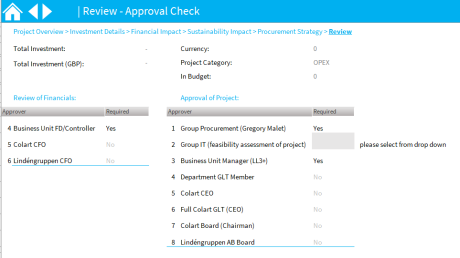
4. Once submitted, you will view the Review – Approval Check page, as shown in the image below.
a. Email confirmation of approvals will be received by the approval requester and an audit trail of all approvals will be attached the workflow when all are received.
b. If any approver declines, the workflow will stop at that stage. You will need to make any required changes and re-submit the request with the new details.
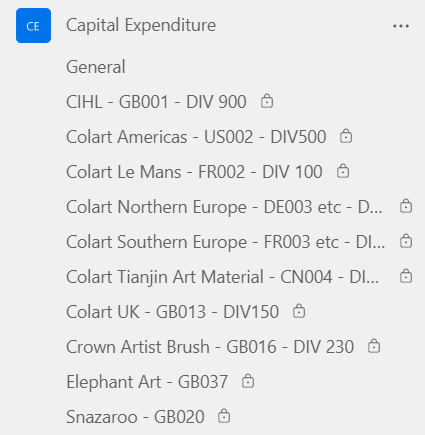
c. Once all approvals are received, the PDF’d toolkit should be saved down into the Team capital expenditure area, for which you all have a confidential section. Please also attach the audit trail which summarises the approvals received for each capital project.
Any questions or issues?
Please contact Group Finance.
We hope you enjoy the ease and efficiency with the new CAPEX approval workflow.
More information …

How do I run a report of what I initiated thru workflow and approval status